
To update siblings after a parent's doctor appointment, write one update in the same four-part format every time — what happened, what changed, what happens next, and how your parent is doing — and put it in one place the whole family can find. One update, written once, beats retyping the same news three different ways and hoping everyone heard the same version.
Imagine this: you've just walked your dad out of his doctor's appointment and driven home. Before you've even taken your coat off, your phone is buzzing. Your sister wants to know what the doctor said. Your brother wants to know if the medication changed. Your other sister wants to know what happens next — and whether she needs to come down this weekend. You type the same update three different ways, answer follow-up questions for an hour, and by dinner you realize you told your brother the old dosage and your sister the new one.
If you've ever wondered how to update siblings after a parent's doctor appointment without turning into the family news desk, the answer is simpler than the group chat makes it feel.
Why does the post-appointment update always fall apart?
It's not that your siblings don't care. It's that a doctor's appointment produces a specific kind of information — part medical detail, part next steps, part emotion — and a group chat is terrible at carrying all three at once.
Here's what usually happens: you send a quick text from the parking lot, but it's rushed and missing the one thing someone needed. Then the questions start. Someone asks about a medication you forgot to mention. Someone else misreads your message and panics. A third person opens the thread at 9 p.m., sees 47 messages, and asks, "So what did the doctor actually say?" — and you start all over again.
The problem isn't your family. The problem is that nobody agreed on how the update would work before the appointment started.
How do I write one update that covers everyone?
The fix is a habit, not an app: after every appointment, write one update and put it in one place where the whole family can find it. Same format every time, so your siblings know where to look and what to expect. Here's a format that works:
1. What happened, in two sentences. Start with the headline, not the backstory. "Dad's cardiology follow-up went well. His blood pressure is down, and the doctor is keeping his current medication." Your siblings' first need is reassurance; give it to them before the details.
2. What changed. This is the section people re-read later, so be specific. New medication, changed dose, stopped medication, new test ordered, referral made — list each one plainly, with the old and new where something changed. If you're not sure you heard a dose right, say so: "I think the doctor said 10 mg instead of 5 mg — I'll confirm with the pharmacy." An honest "I'm not sure" beats a confident mistake.
3. What happens next. Appointments create tasks, and tasks are where families drop the ball. Name the next step, who owns it, and when it's due: "Blood work next Tuesday — I'll take him. Follow-up in six weeks — someone needs to book it." A task with no owner doesn't exist yet.
4. How your parent is doing, honestly. Medical facts are only half the update. "Dad seemed tired afterward but in good spirits" tells your far-away sister something no lab result can. Keep it brief and honest — not a reassurance performance, not a crisis alert.
That's it. Four short sections, written once, sent to everyone.
Why take notes during the appointment instead of after it?
The reason most post-appointment updates are fuzzy is that they're written from memory an hour later, in a parking lot, while you're also thinking about lunch. Bring a notebook or your phone's notes app into the exam room and jot things down as the doctor talks: the words they used, the numbers, the next steps. You don't need a transcript — a handful of lines is enough. And if your parent is comfortable with it, ask the doctor at the end: "Can you tell me the three things I should make sure the family knows?" It gives your update a clean spine.
One more thing worth doing while you're there: ask for a printed visit summary. Most clinics provide one — photograph it and attach it to your update so everyone works from the same page.
Agree on the update job before the next appointment
If you're always the one who goes to appointments, the update job has quietly become yours by default — and that's a recipe for resentment. At your next family check-in, name it out loud: "I'll keep writing the update after appointments, and I'll put it in the same place every time. What I need is for everyone to read it there before texting me questions." That's a fair trade, and most siblings will happily take it.
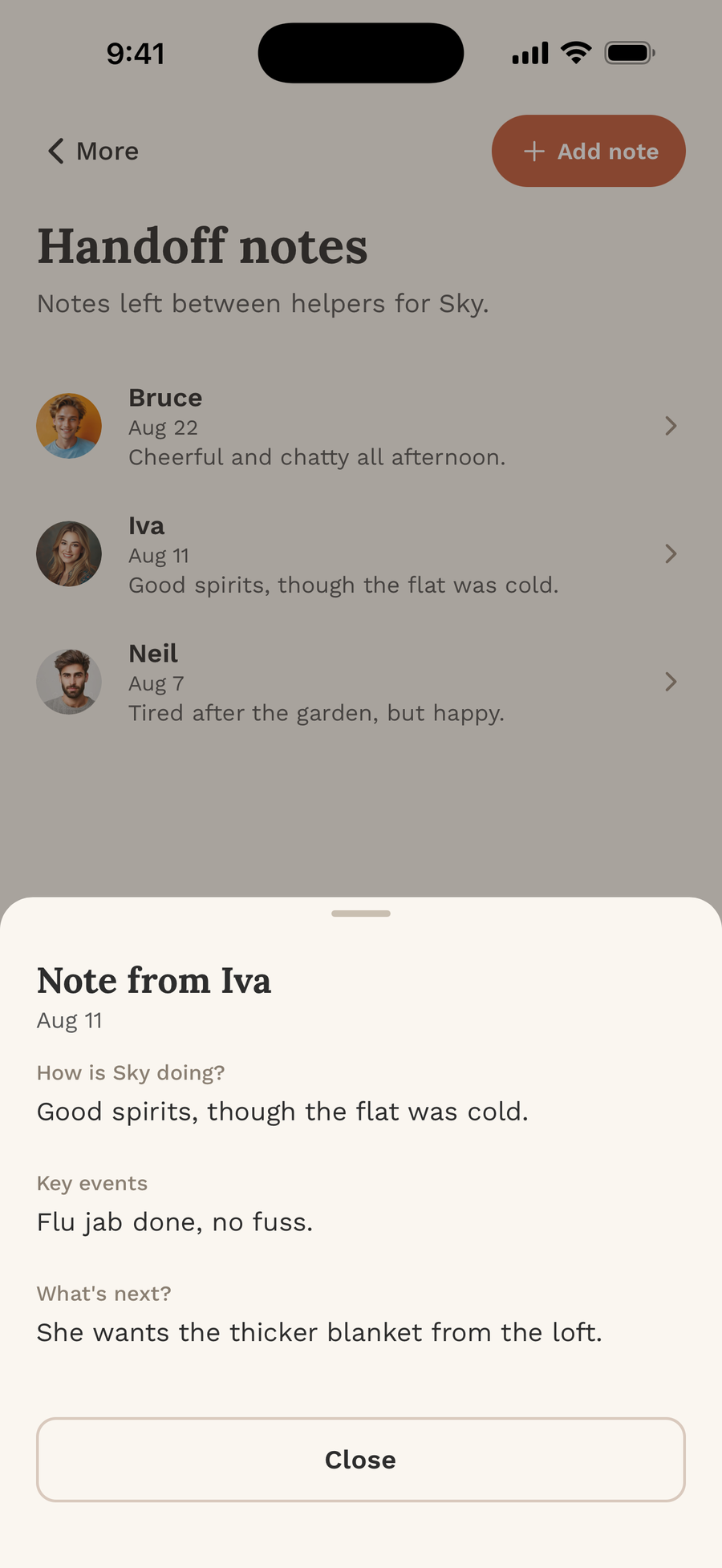
Why I built FairNest around this exact moment
This is the moment that convinced me families needed something better than a group chat: the appointment ends, the information exists in one person's head, and everyone else is waiting on a text. I built FairNest — my own app — so that one update, one handoff note, one medication change lives in a shared Nest where the whole family can see it, instead of scattered across five text threads. When the next appointment comes around, nobody has to ask what happened last time. It's already there.
You don't need an app to start, though. You need one format, one place, and one agreement: the update goes out once, to everyone, in the same shape every time. Your future self — the one who isn't retyping the same update at 9 p.m. — will be grateful.
Bottom line
A family update after your parent's doctor visit doesn't need to be long — four short sections, written once, in the same place every time. This caregiver update template for every doctor appointment is how to tell your siblings what the doctor said without becoming the family news desk, and keeping siblings informed about your parent's health is what stops the 9 p.m. retyping.
This is general information, not medical advice — talk to your parent's doctor about what's right for them. And if your family is still running care through a group chat, you can see how a shared Nest works at getfairnest.com, or find FairNest on the App Store here: https://apple.co/4xRXJuq and on Google Play here: https://play.google.com/store/apps/details?id=com.bizvizorllc.fairnest. You can also follow along on Instagram at https://www.instagram.com/fairnestapp/.